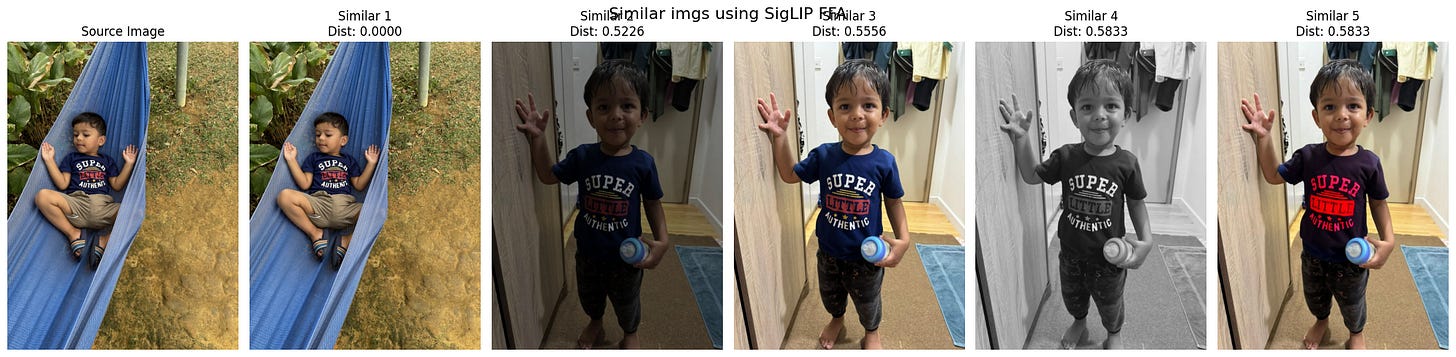
The 30% Wardrobe Hypothesis: Building a Personal Clothes Tracking System
TIL: Building a wardrobe tracking system is surprisingly achievable using modern vision models - no training required!
The Problem
I have a hypothesis that's been bugging me for months: I probably only wear about 30% of my clothes. If true, that means 70% of my wardrobe is essentially waste - taking up space, mental overhead, and probably should be donated.
But how to prove it? I could manually track everything in a spreadsheet, but:
I'd probably forget to update it
It would be tedious
The Solution: Automated Tracking
What if I could just take a quick photo each morning and have everything tracked automatically? Here's what it would look like:
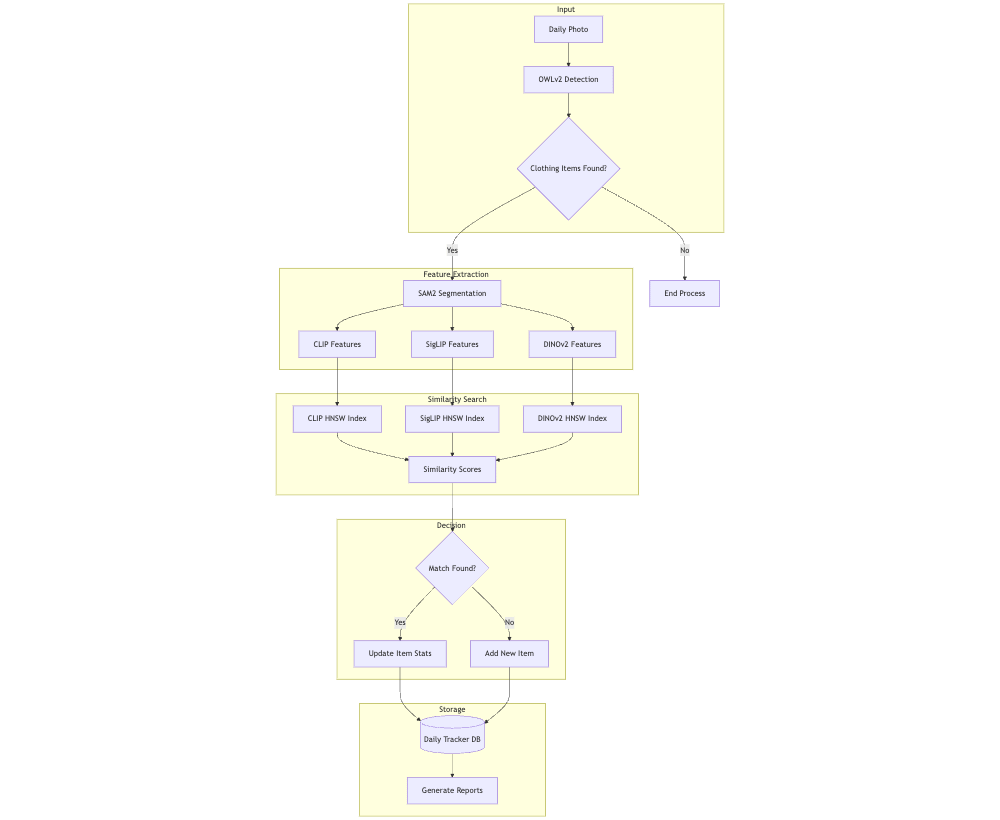
Initial Processing
The system begins by capturing a daily photo of your outfit and processes it in two stages:
OWLv2 detects and classifies clothing items in the image
SAM2 generates precise segmentation masks for each detected item
Feature Extraction
Each segmented item is analyzed by three feature extractors running in parallel:
CLIP for semantic understanding
SigLIP for fine-grained details
DINOv2 for viewpoint-robust features
This parallel processing maximizes speed, with each model creating unique embeddings that capture different aspects of the clothing item.
Similarity Matching
The system uses separate HNSW indexes for each embedding type. For each processed item:
New embeddings are compared with existing ones
Similarity scores are calculated for each embedding type
A weighted combination determines whether it's a new or existing item
Daily Tracking
Here's how the system manages your wardrobe:
New items are added to the Wardrobe DB
Existing items have their wear count updated
Reporting System
Current outfit details
Item wear frequency
Suggested combinations
The Core Challenges
1. Detecting Clothing Without Training
The first challenge was detecting clothing items without training a custom model. Training would require:
Collecting a large dataset of clothing images
Labeling each item type
Managing training infrastructure
Handling model drift and updates
Solution: Comparing Different Detection Models
I evaluated four different models for the initial detection stage:
1. OWLv2 (Zero-Shot Detection)
2. RT-DETR
3. RTDETRv2
4. Florence-2
Here's what I learned from testing them:
Detection Performance:
- OWLv2 excelled at zero-shot detection, recognizing clothing types without specific training. Since I was able to specify which labels are important to me, it only gave me those labels.
- Florence-2 showed similar accuracy to OWLv2 but slower processing times
- RT-DETR and RT-DETRv2 was very fast, however since I did not provide any labels, it showed all kinds of labels that are not beneficial to me.
Processing Speed (average per image): (Cpu on M2 Macbook Pro)
- RTDETRv2: 0.5 seconds
- RT-DETR: 0.8 seconds
- OWLv2: 12 seconds
- Florence-2: 30 seconds
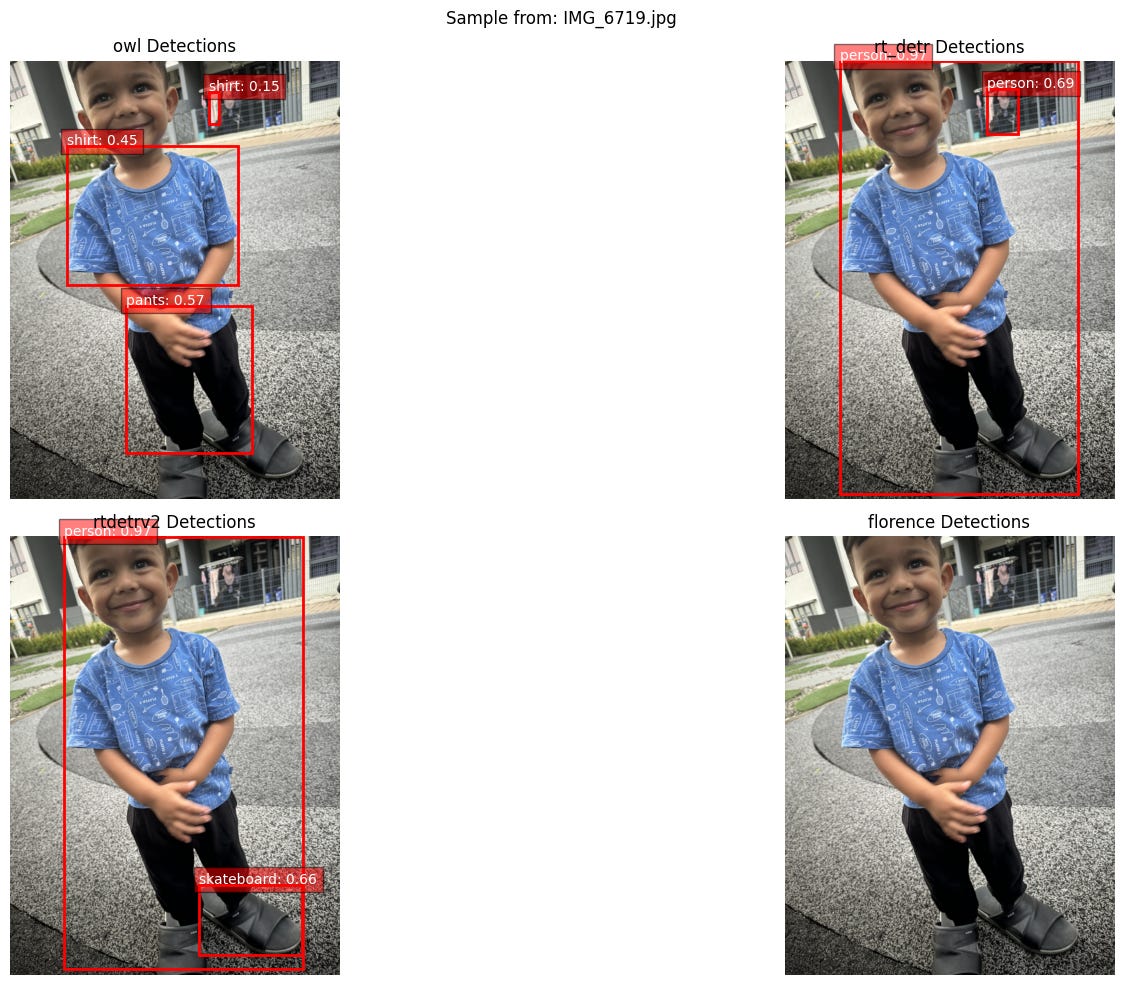
OWLv2 proved to be remarkably capable at zero-shot detection of clothing items. The key advantages:
No training required
Handles unknown clothing types
Provides bounding boxes and confidence scores
Works with natural language descriptions
Good enough speed for daily use
Steps covered:
Detect individual clothing items in a photo
Classify them (t-shirt, jeans, etc.)
Provide bounding boxes
detector = pipeline( model="google/owlv2-base-patch16-ensemble", task="zero-shot-object-detection", device=device )2. Extract the clothes from the images
Once we can detect clothes, how do we extract clean features from only the image? Challenges included:
Separating overlapping items
Handling complex backgrounds
Solution: Segment Anything Model 2 (SAM2)
SAM2 provides precise segmentation masks:
sam2_model = build_sam2_hf( "facebook/sam2-hiera-small", device=device, apply_postprocessing=False ) predictor = SAM2ImagePredictor(sam2_model)Key benefits:
High-quality masks
Fast inference
Works with partial occlusion
Handles complex clothing shapes
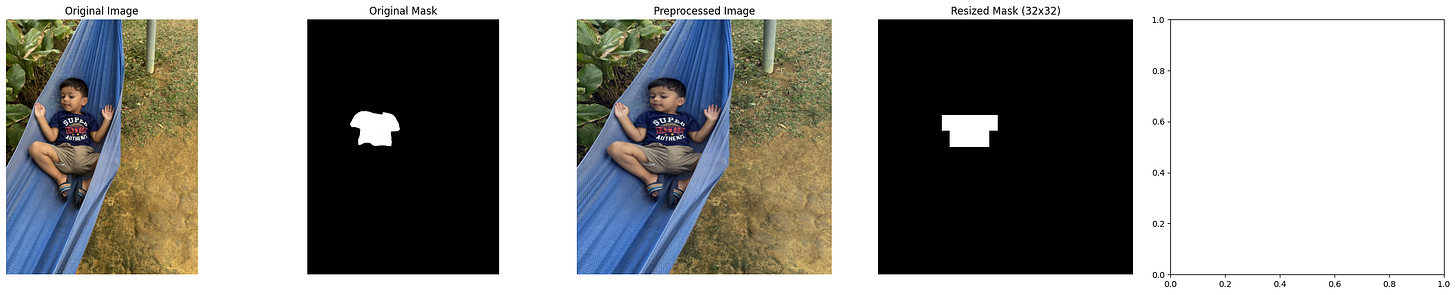
Steps covered:
Extract each item cleanly from the bounding boxes
3. Finding the Best Features
The most complex challenge: which features best identify the same item across different conditions? We're experimenting with three models:
CLIP:
processor_clip = CLIPProcessor.from_pretrained("openai/clip-vit-base-patch32") model_clip = CLIPModel.from_pretrained("openai/clip-vit-base-patch32")SigLIP:
processor_siglip = AutoProcessor.from_pretrained( "google/siglip-so400m-patch14-384" ) model_siglip = SiglipModel.from_pretrained( "google/siglip-so400m-patch14-384" )DINOv2:
processor_dino = AutoImageProcessor.from_pretrained("facebook/dinov2-base") model_dino = AutoModel.from_pretrained("facebook/dinov2-base")We're using HNSW indexes for each embedding type:
# Different dimensions for each model index_sam_dino = hnswlib.Index(space="cosine", dim=768) # DINOv2 index_clip_ffa = hnswlib.Index(space="cosine", dim=768) # CLIP index_siglip_ffa = hnswlib.Index(space="cosine", dim=1152) # SigLIPSteps that will be covered
Generate consistent embeddings for each item
Handle lighting/angle variations
Be fast enough for interactive use
The most interesting challenge turns out to be finding the best and fastest way to generate features that can reliably identify the same piece of clothing across different conditions. Here's what I'm testing:
The Setup
I'm collecting a benchmark dataset by photographing clothing items:
In different lighting (morning/evening/artificial)
At different angles
Both worn and laid flat
With various backgrounds
Stay tuned for detailed benchmarks and full methodology.
Next Steps
Identify which feature embedding to work with
Improve similarity matching for nearly-identical items
Generate usage statistics
Identify rarely-worn items
Add a simple web interface for browsing stats
Next post: Identify which feature embedding to work with